Attending ICACSIS 2026
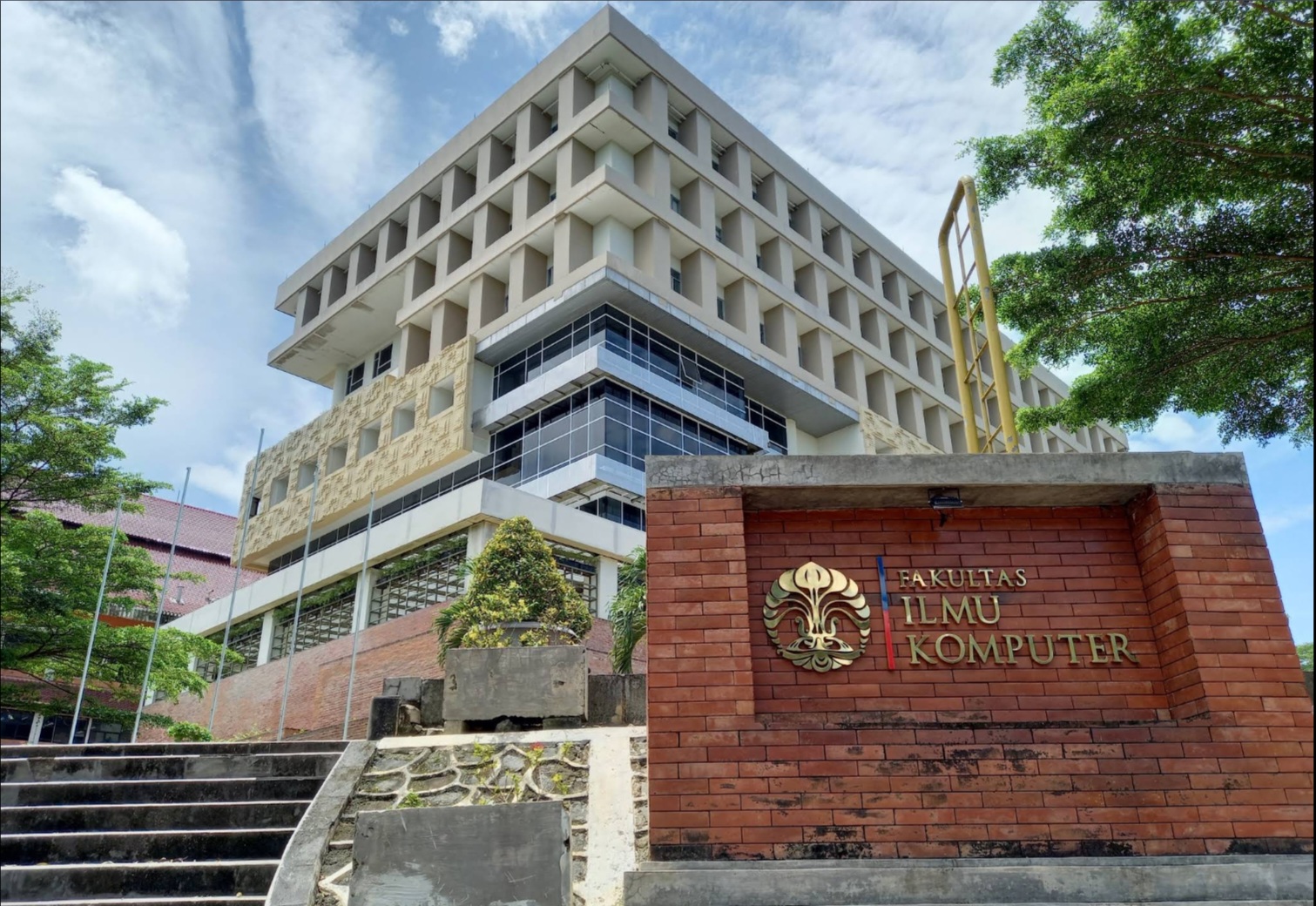
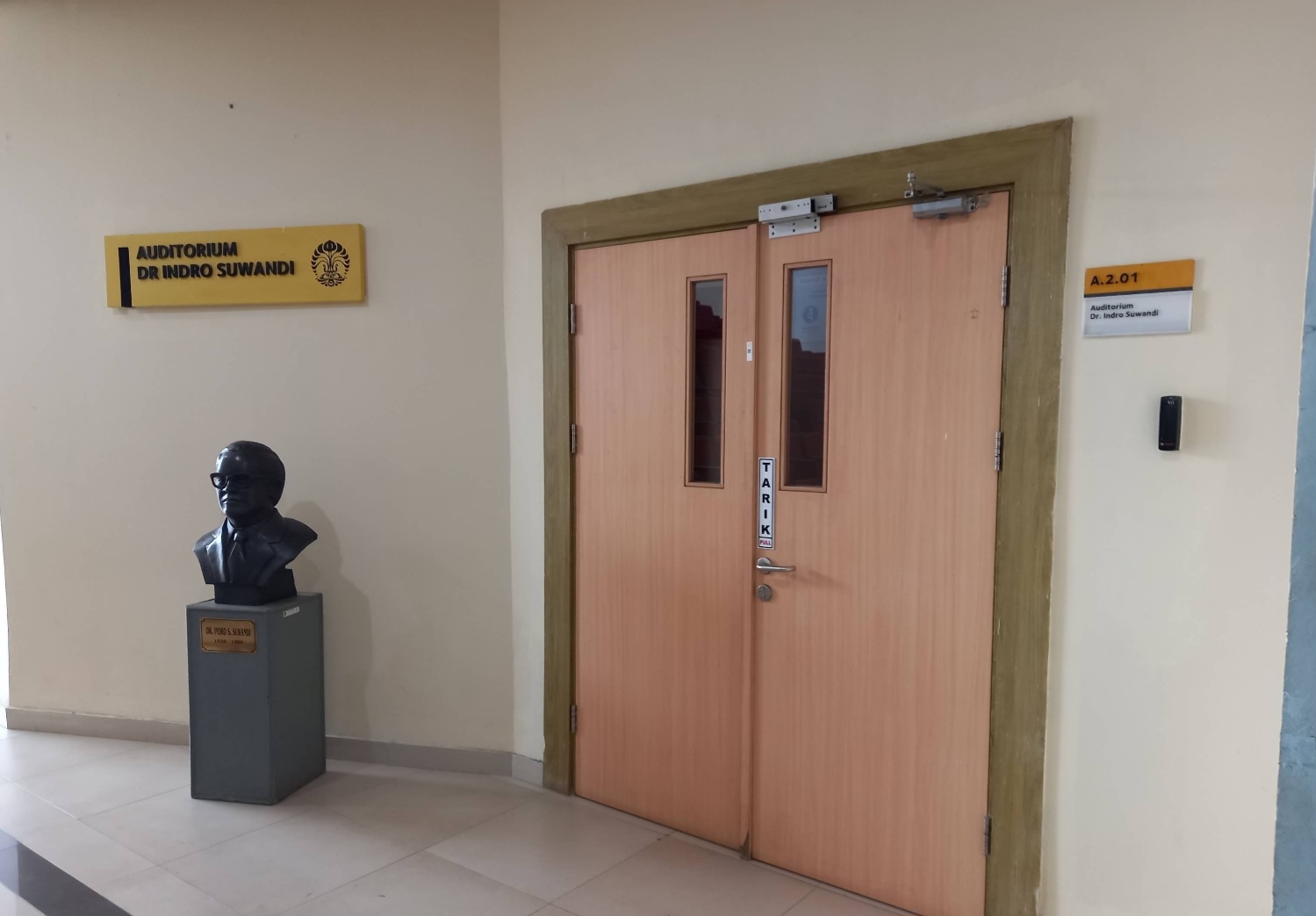
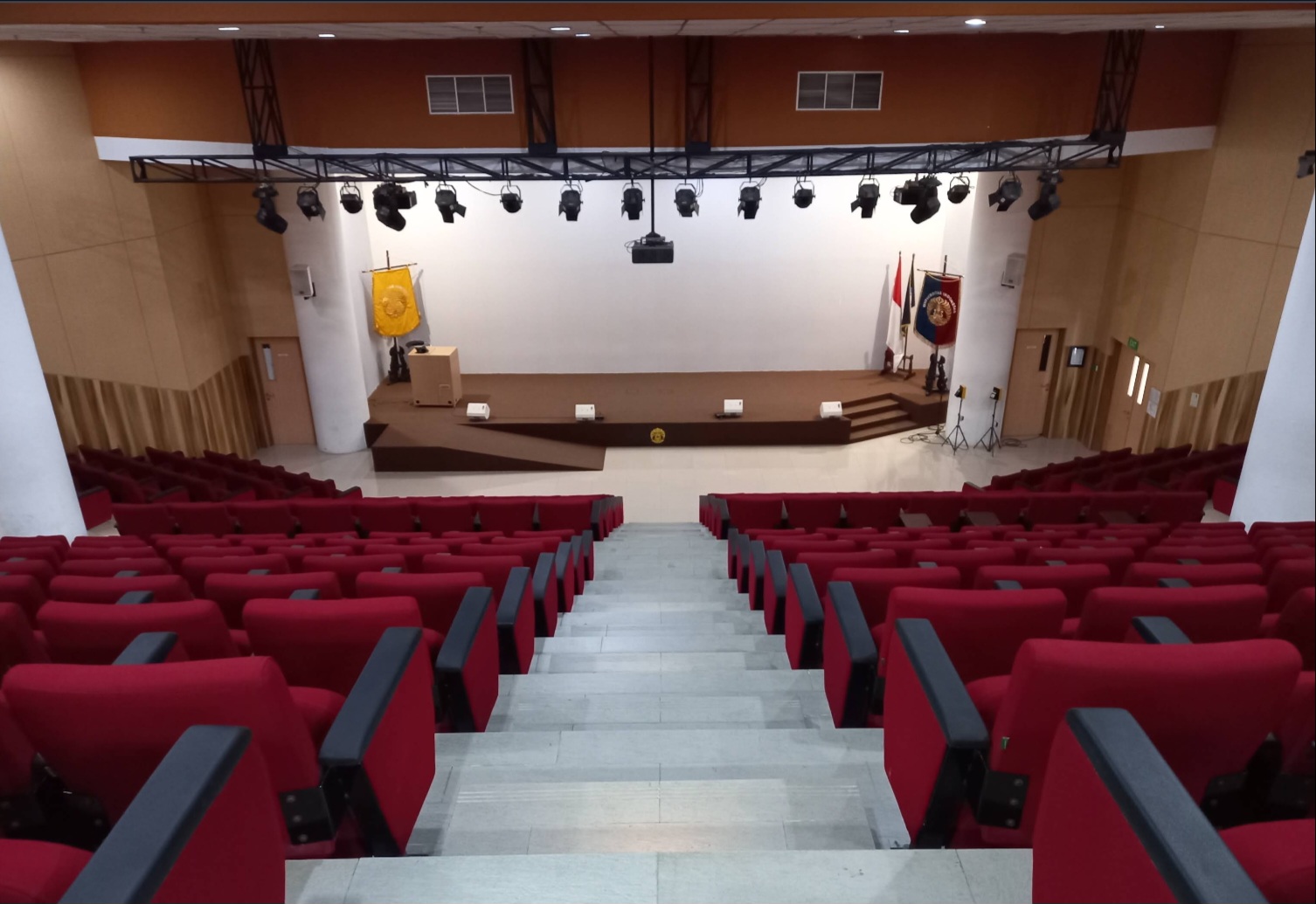
ICACSIS 2026 will be held on October 16-18, 2026 at Auditorium Indro Suwandi, Faculty of Computer Science UI.
Please read further information related to visa on this link before attending ICACSIS 2026.
Location Detail
Address: Jl. Prof. DR. Sudjono D. Pusponegoro, Pondok Cina, Kecamatan Beji, Kota Depok, Jawa Barat 16425
Building: New building, 2nd Floor
Room No: A2.01

THE ADVANCE PROGRAM CAN BE DOWNLOADED ON HERE. (updated on Oct 18, 2026 6:44 AM GMT+7)
THE FOLLOWING IS A SUMMARY OF THE ICACSIS 2026 PROGRAM (ALL-TIME GMT+7).
PLEASE VISIT ONLINE PRESENTER GUIDELINE FOR THE VIRTUAL ROOMS FOR EACH OF THE AGENDA.
=======================================================================
Friday, 16 Oct 2026
13.30–16.30: Registration @Auditorium Indro Suwandi
Saturday, 17 Oct 2026
07:00–08:00: Registration @Auditorium Indro Suwandi
08:00–08:15: Opening Ceremony @Auditorium Indro Suwandi
08:15–09:00: Keynote Speech 1:
Prof. Mahardhika P., Ph.D.
09:00–09:45: Keynote Speech 2:
Prof. Rajkumar Buyya
09:45–10:30: Keynote Speech 3:
Prof. Simon See
10:30–10:45: Coffee Break @Auditorium Corridor
10:45–11:15: Keynote Speech 4: @Auditorium Indro Suwandi
Dr. Fauzan A., S.T., M.Eng.
11:15–11:45: Keynote Speech 5:
Chairul Hudaya, Ph.D
11:45–13:30: Lunch Break @Auditorium Corridor
13:30–14:15: Keynote Speech 6:
Prof. Dr. Arif S., S.P., M.Si.
14:15–15:00: Invited Speaker 1: @Auditorium Indro Suwandi
Ing. Karel Juryca, Ph.D
15:00–15:40: Break @Auditorium Corridor
15:40–16:25: Invited Speaker 2: @Auditorium Indro Suwandi
M. Anwar M, S.Kom., M.Kom., Ph.D.
18:00–21:00: Gala Dinner @Auditorium Coridor
Sunday, 18 Oct 2026
08:00–09:45: Parallel Session 1 @8 Classrooms (Session and Room as shown below)
09:45–10:00: Coffee Break @A1.52
10:00–11:45: Parallel Session 2 @8 Classrooms
11:45–12:45: Break @A1.52
12:45–14:45: Networking Session 1 @Ruang Sidang 4th Floor
14:45–15:00: Coffee Break @A1.52
15:00–16:45: Networking Session 2 @Ruang Sidang 4th Floor
16:45–17:15: Closing and Awards @Auditorium Indro Suwandi
Thank you for contributing to ICACSIS 2026. To ensure that all technical sessions run smoothly and on schedule, all presenters are kindly requested to follow the guidelines below.
1. Presentation Format
- Each accepted paper must be presented during its assigned technical session.
- Presentations must be delivered in English.
- Presenters are encouraged to use PowerPoint (.ppt/.pptx) or PDF format.
- Slides should be clear, concise, and readable from a distance.
- Presenters are encouraged to use the official ICACSIS 2026 presentation template, if provided by the committee.
2. Presentation Duration
Each paper is allocated 20 minutes, consisting of:
- 15 minutes – Oral presentation
- 5 minutes – Questions and Answers (Q&A)
Presenters are expected to strictly observe the allocated time. The Session Chair may stop a presentation that exceeds the scheduled duration to ensure that subsequent presentations remain on schedule.
3. Recommended Presentation Structure
Presenters are encouraged to organize their presentation as follows:
- Title, authors, and affiliations
- Background and motivation
- Research problem/objectives
- Proposed method or approach
- Experimental setup or study design
- Results and key findings
- Discussion
- Conclusion and future work
- Acknowledgment, if applicable
The presentation should emphasize the main contribution and findings rather than presenting every detail contained in the paper.
4. Before the Session
Presenters should:
- Check the conference program and confirm the date, time, room, and session of their presentation.
- Arrive at the assigned room at least 15 minutes before the session begins.
- Introduce themselves to the Session Chair and Student Volunteer/Technical Support team.
- Prepare the presentation file on a USB flash drive and keep a backup copy accessible through cloud storage or email.
- Upload or transfer the presentation file to the conference laptop before the session starts, when required.
- Check that fonts, figures, equations, videos, animations, and other multimedia elements display correctly.
- Test the microphone, presentation clicker, and other equipment when possible.
5. During the Presentation
Presenters should:
- Follow the instructions of the Session Chair.
- Begin the presentation promptly when invited.
- Clearly introduce the research topic and its main contribution.
- Speak clearly and at an appropriate pace.
- Keep track of the remaining presentation time.
- Respect time reminders provided by the Session Chair.
- Conclude the presentation within the allocated 15 minutes.
- Remain available for the 5-minute Q&A session.
6. Question and Answer Session
During the Q&A:
- Questions will be managed by the Session Chair.
- Presenters should provide concise and relevant answers.
- If a question requires an extensive discussion, the presenter may continue the discussion with the participant after the session.
- Presenters should respect different academic perspectives and maintain professional communication throughout the discussion.
7. Technical Requirements
Presenters are advised to:
- Use sufficiently large fonts and high-resolution figures.
- Minimize excessive text on individual slides.
- Ensure that charts, tables, and diagrams are readable.
- Avoid relying on internet connectivity during the presentation.
- Embed necessary fonts, videos, or multimedia files whenever possible.
- Bring an offline backup of all presentation materials.
8. Attendance
Presenters are expected to:
- Attend the entire technical session in which their paper is scheduled.
- Be present before their presentation slot.
- Remain in the room until the session concludes whenever possible.
- Participate professionally in discussions with other presenters and participants.
9. No-Show Policy
Presentation of an accepted paper is an important requirement of conference participation.
Authors who are unable to present their paper should immediately contact the ICACSIS 2026 committee and, where permitted, arrange for an eligible co-author or substitute presenter.
Failure to present an accepted paper without prior notification may result in the paper being recorded as a no-show and may affect its eligibility for inclusion in the conference proceedings, subject to the applicable conference and IEEE policies.
10. Presenter Checklist
Before your session, please make sure that:
I have checked my presentation schedule and room.
My presentation is prepared in English.
My presentation fits within 15 minutes.
I have prepared for approximately 5 minutes of Q&A.
I have an offline backup of my presentation file.
I have checked all figures, videos, fonts, and animations.
I will arrive at least 15 minutes before the session.
I have introduced myself to the Session Chair/Student Volunteer.
My presentation file has been tested on the conference computer.
I understand and will follow the Session Chair’s time signals.
ICACSIS 2026 – Online Presenter Guidelines
The 15th International Conference on Advanced Computer Science and Information Systems (ICACSIS 2026)
* Parallel Sessions: Sunday, October 18, 2026
* Presentation Mode: Online (Live Virtual Presentation)
* Time Zone: Western Indonesia Time (WIB, UTC+7)
* List of rooms: Room A2.06 | A2.07 | A2.08 | A2.09 | A1.09 | A1.10 | A3.05 | A3.06
Thank you for contributing to ICACSIS 2026.
To ensure the smooth conduct of online technical sessions, maintain academic integrity, and support compliance with applicable IEEE conference publication policies, all online presenters are required to follow the guidelines below.
****
1. Online Presentation Format
- Each accepted paper must be presented during its assigned technical session.
- Online presentations will be conducted live through the official virtual meeting platform designated by the Organizing Committee.
- Presentations and discussions must be conducted in English.
- The presenter must be an author of the accepted paper
- Presenters must remain available for real-time interaction with the Session Chair and conference participants.
- Pre-recorded presentations may only be used as an approved alternative or backup arrangement, subject to the Organizing Committee’s instructions.
- Submission of presentation slides or a pre-recorded video alone does not automatically fulfill the conference presentation requirement.
2. Presentation Duration
Each paper is allocated 20 minutes, consisting of:
- 15 minutes: Oral presentation
- 5 minutes: Questions and Answers (Q&A)
Presenters must strictly observe the allocated time.
The Session Chair may interrupt or conclude a presentation that exceeds the scheduled duration to ensure the technical session remains on schedule.
3. Recommended Presentation Structure
Presenters are encouraged to organize their presentation as follows:
- Title, authors, and affiliations
- Background and motivation
- Research problem and objectives
- Proposed method or approach
- Experimental setup or study design
- Results and key findings
- Discussion
- Conclusion and future work
- Acknowledgment, if applicable
Presenters should emphasize the main research contributions and findings rather than attempting to explain every detail of the paper.
4. Before the Online Session
Online presenters must:
- Check the official conference program and confirm their presentation date, time, and session.
- Join the designated virtual meeting room at least 15 minutes before the session begins.
- Use their full name as registered for the conference.
- Identify themselves to the Session Chair and technical support team.
- Ensure that their microphone, webcam, speakers, and screen-sharing functions are working properly.
- Prepare the final presentation slides before joining the meeting.
- Use a stable internet connection, preferably through a wired connecconnec
- Remain connected and available throughout the assigned technical session.
- Follow all instructions provided by the Session Chair and technical support team.
The official virtual meeting link and access instructions will be communicated by the Organizing Committee.
5. Technical Requirements
Online presenters are responsible for ensuring that their equipment and internet connection are suitable for delivering a live presentation.
Minimum recommended setup:
- A desktop or laptop computer with a functioning microphone and webcam.
- A stable broadband internet connection.
- The latest supported version of the designated virtual meeting application.
- A quiet environment with minimal background noinois
- A PowerPoint (.ppt/.pptx) or PDF presentation file.
- A backup internet connection, if available.
Presenters should test screen sharing, audio, video, and presentation materials before their session.
Presenters are encouraged to keep a backup copy of their slides accessible locally and through cloud storage.
6. During the Online Presentation
Presenters must:
- Follow the instructions of the Session Chair.
- Activate their microphone when invited to present.
- Keep their webcam enabled during the presentation whenever technically feasible.
- Share their presentation slides through the designated meeting plaplatfor
- Introduce themselves and clearly explain their research contributions.
- Deliver the presentation live within the allocated 15 minutes.
- Respect all time reminders provided by the Session Chair.
- Remain connected and available for the Q&A session.
The Session Chair and technical support team may request that presenters adjust their audio, video, or screen-sharing settings when necessary.
7. Questions and Answers (Q&A)
Each presentation includes a 5-minute interactive Q&A session.
- Questions will be moderated by the Session Chair.
- Presenters must remain online and respond to questions in real time.
- Presenters should provide clear, concise, and academically appropriate answers.
- Questions may be delivered verbally or through the meeting platform’s chat function, as directed by the Session Chair.
- Presenters should respect different academic perspectives and maintain professional communication.
Active participation in the Q&A session is an important component of the online conference experience.
8. Internet Connectivity and Technical Difficulties
If a presenter experiences technical difficulties:
- Immediately attempt to reconnect to the official virtual meeting room.
- Notify the Session Chair or technical support team through an available communication channel.
- Follow the Session Chair’s instructions regarding possible rescheduling within the session or other approved arrangements.
- If a backup presentation has been provided, the Organizing Committee may authorize its use when appappropriat
- The presenter must remain available for interaction or an alternative Q&A arrangement approved by the Organizing Committee.
Technical difficulties do not automatically result in a no-show classification.
However, the Organizing Committee will assess whether the paper has been adequately presented in accordance with the applicable conference and IEEE policies.
9. Presenter Attendance and Verification
To ensure accurate documentation of conference participation:
- Presenters must join the official virtual meeting room using an identifiable name.
- The Session Chair or technical support team will verify presenter attendance.
- Presenters must respond when called upon for their scheduled presentation.
- Presenters must remain available during their presentation and Q&A.
- The Organizing Committee may maintain attendance records, presentation status reports, and session documentation for conference administration and publication compliance.
Presenters must not share their official presentation access with unauthorized individuals.
10. No-Show Policy and IEEE Publication Compliance
Presentation of an accepted paper is an essential requirement for conference participation and publication eligibility.
In accordance with applicable IEEE conference publication policies:
- Authors are expected to present their accepted papers during the conference.
- Papers that are not presented may be excluded from distribution after the conference, including publication in the IEEE Xplore Digital Library.
- The Organizing Committee will document presentation attendance and identify papers that were not presented.
- An author who is unable to present must notify the Organizing Committee as soon as possible.
- An eligible co-author or another presenter may present the paper only with prior approval from the Organizing ComCommitte
- Any alternative presentation arrangement must be approved and appropriately documented.
IEEE reserves the right to exclude a paper from distribution after the conference, including IEEE Xplore, if the paper is not presented at the conference.
The final determination of presentation status will be made by the Organizing Committee in accordance with the applicable IEEE requirements and conference policies.
Acceptance and registration alone do not guarantee publication in IEEE Xplore.
11. Online Presenter Checklist
Before your session, please ensure that:
I have checked my official presentation schedule.
I have received the virtual meeting access information.
I have prepared my presentation in English.
My presentation fits within the allocated 15 minutes.
I am prepared for the 5-minute Q&A session.
My microphone, webcam, and screen-sharing functions work proproperl
I have a stable internet connection.
I have prepared a backup copy of my presentation.
I will join the virtual meeting room at least 15 minutes before the session.
I will remain available throughout my assigned technical session.
I understand the conference’s no-show policy and its possible implications for IEEE Xplore publication.